
PDFを任意の場所に自動ダウンロードする
chromeの場合はnightwatch.jsonにPDFをダウンロードするような設定を入れてあげると上手くいくが、
firefoxの場合はprofileからの指定となる。
【Nightwatch.js】PDFを任意の場所に自動ダウンロードする ※chrome
nightwatch.json
profileの指定をしてあげればOK。
あとはprofileで開いたブラウザでよしなに。
{
    "src_folders": [
        "tests"
    ],
    "output_folder": "reports",
    "selenium": {
        "start_process": true,
        "log_path": "./log",
        "port": 4444
    },
    "test_settings": {
        "default": {
            "desiredCapabilities": {
                "browserName": "firefox"
            },
            "selenium": {
                "server_path": "./lib/selenium-server-standalone-3.4.0.jar",
                "cli_args": {
                    "webdriver.gecko.driver": "./lib/geckodriverv0.18.0-win32.exe",
                    "webdriver.firefox.profile": "nightwatch"
                }
            }
        },
        "firefox": {
            "desiredCapabilities": {
                "browserName": "firefox",
                "acceptInsecureCerts": true
            }
        }
    }
}
firefox
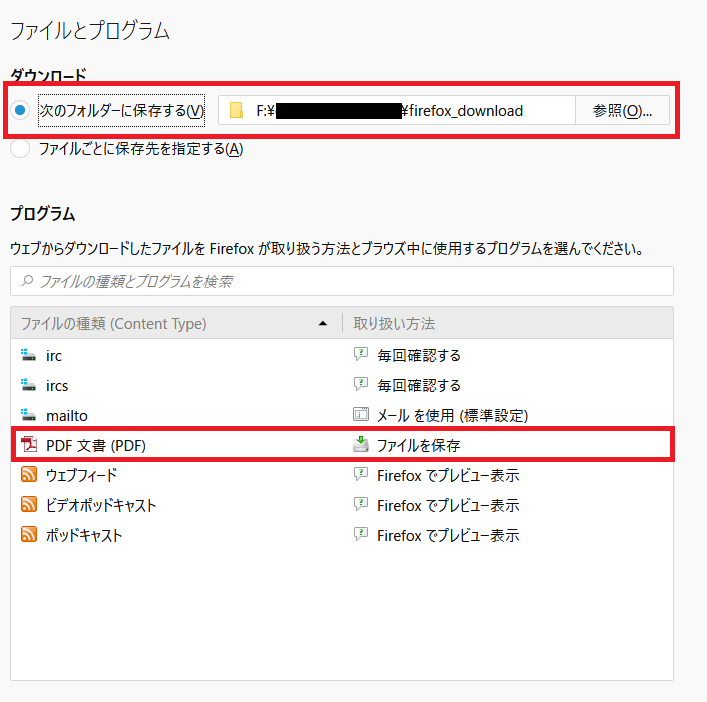
オプション→一般→ファイルとプログラム
・ダウンロード
「次のフォルダーに保存する」
・プログラム
ファイルの種類からPDF文書(PDF)に該当する取扱い方法を「ファイルを保存」に変更。
設定後ブラウザを閉じる。